
People Remover AI: Remove Person from Photo
Perfect for product shots, portraits, avatars, and ecommerce images.
Perfect for product shots, portraits, avatars, and ecommerce images.
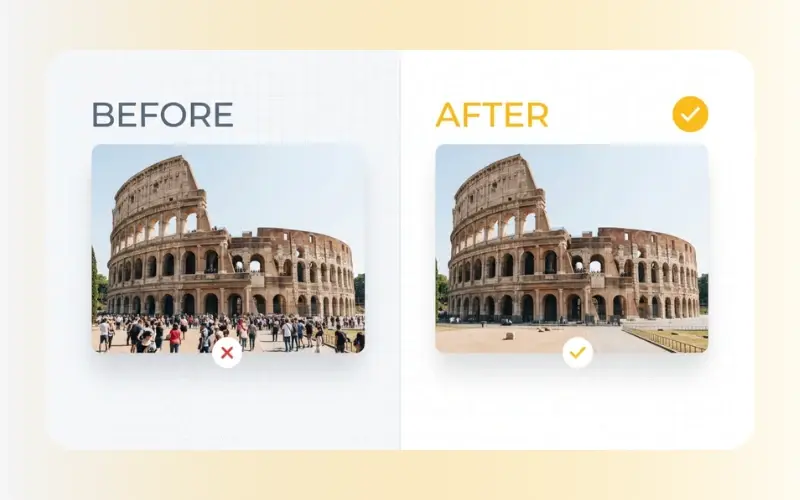
Have you ever captured a scenic vacation photo only to find strangers cluttering the view? Our smart people remover ai is here to clean up your shots by easily erasing unexpected photobombers and crowds. This specialized remove person from photo ai analyzes your image to reconstruct the background behind the removed subject. Whether you are learning how to remove people from photos or need a fast background people remover for social media uploads, our browser-based utility delivers prompt results without requiring complex editing software.
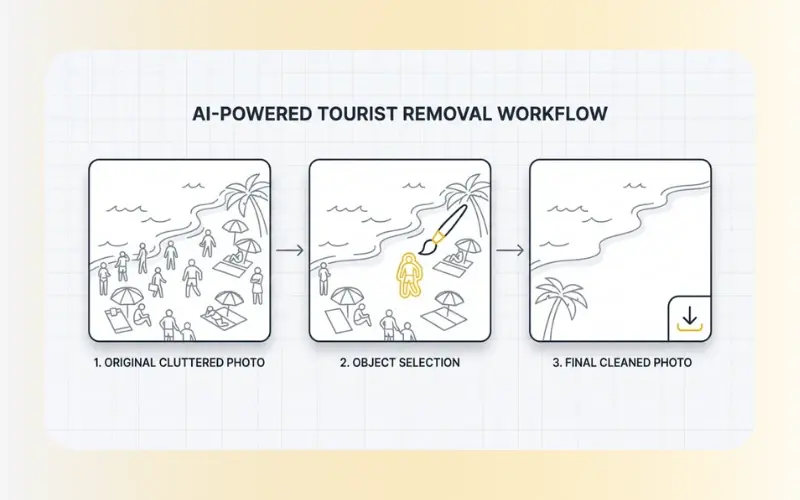
Cleaning up your photos is straightforward. Simply follow these steps:
Upload your photo: Drag and drop your JPEG, PNG, or WebP image into the tool.
Brush over the subject: Adjust the brush size and highlight the person or crowd members you wish to delete.
Download your edited photo: The system will process the image data, fill in the background, and let you save the final image.
Why use our specialized photo cleaner?
Smart Background Reconstruction: The algorithm evaluates the surroundings of the selected area to fill in the missing space naturally.
Effortless Tourist Removal: This tool is ideal for travel photography, helping you quickly clear crowded landscapes or popular tourist landmarks.
No Manual Cloning Required: Unlike traditional editing software, you do not need advanced editing skills to learn how to remove people from background setups.
Saves Editing Time: Clean up multiple distracting subjects in seconds, speeding up your photo-editing workflow.
Our tool supports standard photo formats to accommodate different editing workflows:
Input Formats: JPEG, JPG, PNG, and WebP.
Data Security: We prioritize your privacy. All uploads are processed over secure SSL-encrypted connections. Your images are automatically and permanently deleted from our servers within a short period after processing.
When you use the brush to highlight someone, the people remover ai identifies the textures, colors, and perspective of the surrounding area. It replaces the unwanted person with matching background content, helping you remove people from background scenes cleanly. This automated inpainting technique is highly effective at replacing subjects with backgrounds like sky, sea, forest, or wall textures.
Using our brush tool to select the subject tells the AI tool exactly which pixels to replace. It fills the gap with estimated background pixels so the rest of your original scenery stays undisturbed.
Yes. While this tool is highly optimized to recognize human figures, it also works effectively to delete signs, trash cans, or stray objects.
Yes, you can upload and clean your photos online for free without creating an account or paying subscription fees.
If you need to make additional adjustments to your clean photo, check out our Remove Watermarks tool to erase unwanted stamps, dates, or logos. If the final image looks slightly blurry after editing, use our AI Enhance Images tool to restore resolution and detail before saving.