
Remove Watermarks from Photo Online
Perfect for product shots, portraits, avatars, and ecommerce images.
Perfect for product shots, portraits, avatars, and ecommerce images.
If you are looking for an easy guide on how to remove watermark from photo assets, you are in the right place. Watermarks, logos, and date stamps can distract from your main subject. Our online utility helps you remove watermark from photo files quickly, giving you a clean result. Whether you want to prepare a graphic for a professional presentation or need to clean up an image for personal use, EzPic provides a simple, browser-based solution.
By analyzing the pixels surrounding the watermark, the underlying algorithm estimates what should be underneath and fills in the area with realistic textures. Upload your image to our watermark remover tool to experience automated watermark removal directly from your browser.
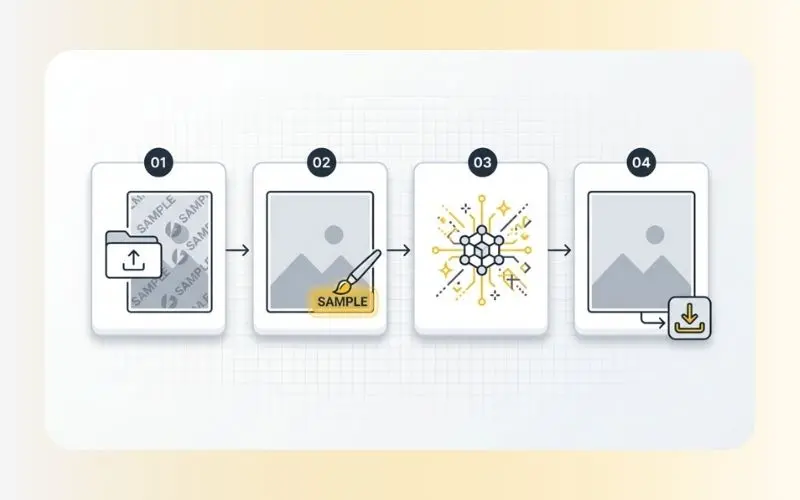
To get natural results from our online watermark remover tool, follow this detailed, step-by-step process:
Step 1: Upload Your Image: Drag and drop your image directly into the processing area, or click the upload button to browse your local storage. Our system supports standard file formats, including JPG, PNG, and WebP. For optimal processing speed, we recommend uploading files under 15 megabytes.
Step 2: Select the Watermark or Logo: Once your image is loaded, choose your preferred removal method:
Auto-Detection: Let our system scan the image to automatically identify and highlight common watermark patterns, copyright text, or stamp locations.
Manual Brush Selection: If the watermark is highly stylized or faint, select the brush tool. Adjust the brush size using the slider to match the thickness of the overlay, then paint over the watermark. It is usually best to paint slightly outside the edges of the watermark to ensure the tool detects the entire boundary.
Step 3: Let the Watermark Eraser Process the Image: Click the "Remove" or "Erase" button. The watermark eraser will analyze the masked pixels, examine the textures and lines in the surrounding image, and calculate an appropriate fill. This process typically takes between 5 to 10 seconds depending on the complexity of the background.
Step 4: Preview and Download: Examine the processed area in the preview window. If you are satisfied with the natural texture blend, click "Download" to save your clean image. If any faint traces remain, you can apply a smaller manual brush to the residual spots and run the eraser tool once more.
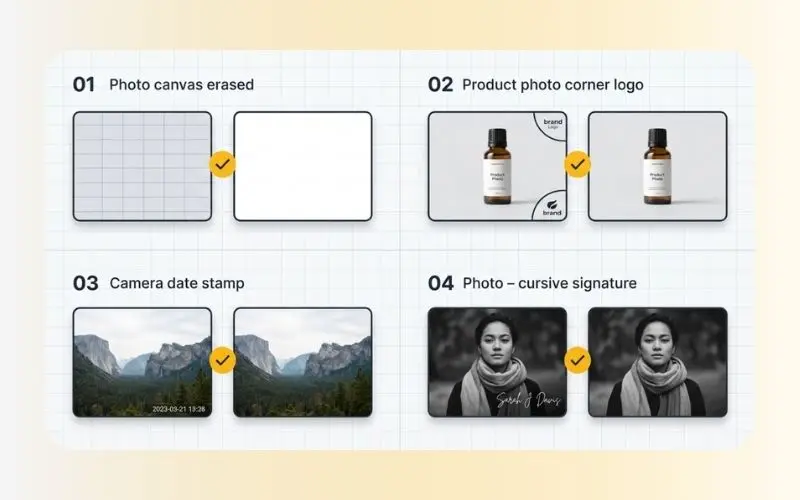
Digital images are often cluttered with various types of visual overlays. Our tool is optimized to recognize and remove logo from photo layouts and clean up several distinct categories of image obstructions:
Semi-Transparent Watermarks: Many stock photography platforms use semi-transparent grids or diagonal text overlays across the entire image. Our tool analyzes the contrast differences caused by these overlays, works to reverse the transparency effect, and restores the colors of the underlying objects.
Solid Branding & Logos: If you need to remove logo from photo layouts (such as website URLs or social media handles placed in the corner), the tool treats these solid graphic elements as objects to be removed. It removes the solid colors and uses surrounding image patterns to reconstruct the background.
Camera Metadata Overlays: Older digital cameras and certain smartphone settings embed bright date stamps, time stamps, and camera models directly onto the photo. Because these stamps have sharp edges and high contrast, our watermark eraser isolates them quickly, removing the text without bleeding colors into the rest of the photograph.
Personalized Signatures: Photographers often place a custom signature or small logo in the lower corners of their proofs. Our manual brush tool allows you to isolate these unique cursive fonts and signature lines, erasing them to give you a distraction-free view of the image layout.
Choosing the right approach depends on your available time, budget, and editing experience. Below is an objective comparison between using our automated tool and manual desktop editing software (such as Photoshop or GIMP):
Learning Curve
Our AI Watermark Remover: Extremely low learning curve; no advanced technical or photo editing skills are required.
Manual Editing (Photoshop / GIMP): High learning curve; requires understanding of complex tools like clone stamps, layer masks, and manual brushing.
Processing Time
Our AI Watermark Remover: Typically takes between 5 to 15 seconds to calculate and fill the selected area.
Manual Editing (Photoshop / GIMP): Can take anywhere from 5 to 30 minutes depending on the complexity of the background.
Device Compatibility
Our AI Watermark Remover: Runs entirely inside any standard web browser (compatible with mobile, tablet, and desktop).
Manual Editing (Photoshop / GIMP): Requires a high-performance computer and local software installation.
Cost
Our AI Watermark Remover: Available with free online access directly in your browser.
Manual Editing (Photoshop / GIMP): Often requires purchasing expensive monthly or annual software subscriptions.
Reconstruction Detail
Our AI Watermark Remover: Uses automated deep-learning algorithms to estimate and paint background patterns.
Manual Editing (Photoshop / GIMP): Delivers manual accuracy but relies completely on tedious, hands-on labor.
If you upload a photo with a highly busy background and the initial removal appears smudged, use these tips to improve the output:
Use a Smaller Brush: When highlighting manually, avoid brushing over large sections of the clean background. Keeping your brush strokes tight and localized to the watermark lines gives the system a better frame of reference.
Process in Stages: If the watermark is large or consists of multiple separate text lines, do not erase them all at once. Paint and erase one word or line at a time. This allows the system to calculate smaller, highly accurate patches step-by-step.
Combine with Other Tools: If a watermark was placed over an unwanted element, you can use our image cleaner or people remover ai tools to clean up larger structural distractions in the frame.
Our web-based utility is built to balance rapid browser processing with quality image retention.
Supported Upload Formats: JPG, JPEG, PNG, WebP.
Maximum File Dimensions: Up to 4096 x 4096 pixels.
File Size Constraint: Up to 15 MB per upload.
Platform Accessibility: Compatible with Chrome, Safari, Edge, Firefox, and major mobile browsers (iOS & Android).
Security Protocol: Secure Sockets Layer (SSL) encryption protects all uploads. Files are automatically cleared from our temporary storage nodes within 2 hours.
Watermarks are valuable tools used by photographers, artists, and agencies to protect their intellectual property and signal ownership. While our tool is designed to assist with legitimate image workflows, it is important to understand the ethical boundaries surrounding watermark removal.
Restoring Your Own Work: If you lost the original, un-watermarked high-resolution source file of a photograph you took, and only have a watermarked proof remaining.
Personal or Educational Use: If you are using an image strictly for private study, local offline presentations, mockups, or non-commercial research where the watermark impedes analysis.
Public Domain Images: If the image itself has legally entered the public domain, but a third-party distributor has stamped a digital watermark onto the file.
Commercial Redirection: Removing a copyright notice to use an image in paid advertising, product packaging, or on a business website without purchasing a license.
Copyright Infringement: Erasing watermarks from stock photography websites to bypass purchasing the asset. Under many jurisdictions, altering or removing "Copyright Management Information" (including watermarks) without authorization is a legal violation.
Always respect the hard work of creative professionals. If you do not own the image, consider contacting the creator to obtain a clean, licensed copy.
No. Our tool processes and retains the original dimensions of your image. Unlike some basic compression tools, our watermark eraser only alters the specific pixels within the selected brush area, ensuring that the remaining parts of your photo retain their original sharpness and resolution.
This online utility is designed strictly for raster image formats (such as JPG, PNG, and WebP). If you have a PDF containing watermarked images, you will first need to extract the pages as images to turn them into compatible image files before uploading.
If the background is highly detailed (like grass, water ripples, or a crowd), the system might occasionally produce a slightly soft patch. To resolve this, run the brush tool over the blurry area a second time with a smaller brush size, or run the image through our image upscaler to restore texture clarity.
Once your image is clean of watermarks and logos, you can use our suite of web-based image processing tools to optimize it for your website, presentation, or portfolio:
Enhance Image Quality: If the watermark removal left minor soft spots, run your photo through our Enhance Images (AI Image Enhancer) to restore sharpness and balance contrast.
Compress for the Web: High-resolution photos can slow down web page loading speeds. Use our online image compressor tool to shrink file sizes while retaining visual clarity.
Convert Image Formats: Need to switch formats to save bandwidth? Convert your processed images easily using our webp converter or convert png to webp converters, or save WebP files back to standard formats using our convert webp to png or web to jpeg convert utilities.